Where things go
conf/platform supplies addresses and settings used by the classic route. The image index tells Python where each item starts and how large it is.
How does a computer put new software on a TV box? Meet pyamlboot: the messenger that helps an Amlogic chip load small helpers, then write firmware to storage.
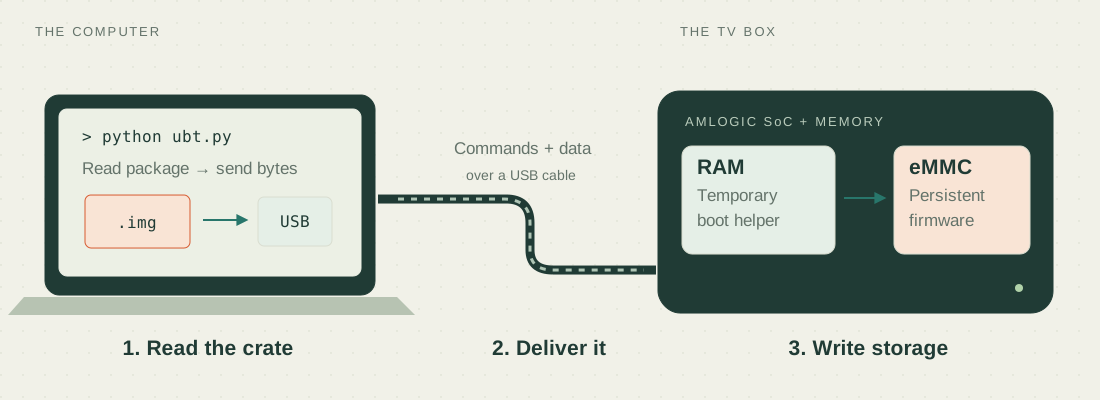
This is an explanation, not a success report. No board was connected or flashed for this guide. Your exact .img was not available at the supplied home-directory path, so its contents, selected protocol and AM6+ compatibility are unknown. Nothing on this website accesses USB or runs a shell command.
Think of an Amlogic burning image as a delivery crate—not a photograph, and not necessarily a raw copy of a disk.
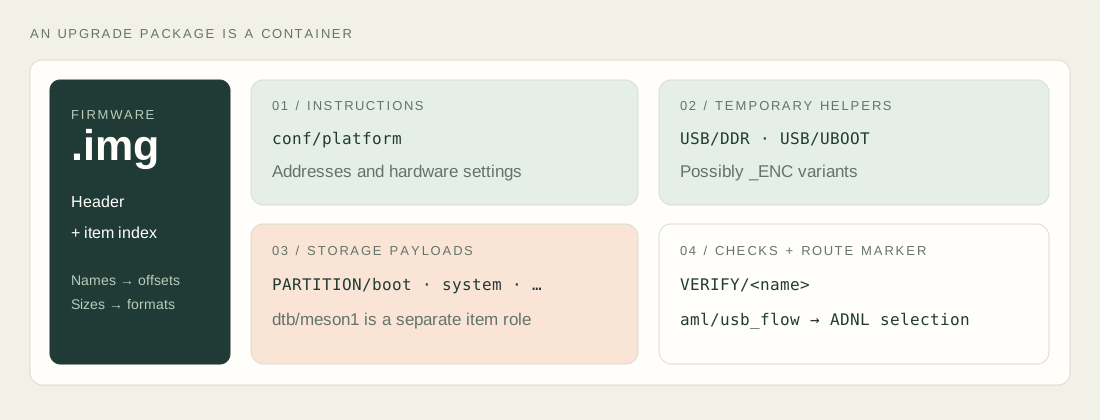
conf/platform supplies addresses and settings used by the classic route. The image index tells Python where each item starts and how large it is.
USB/DDR and USB/UBOOT are boot-stage payloads. Secure variants may use _ENC. They must match the hardware and its security requirements.
PARTITION/… items supply persistent firmware. Separate VERIFY/… items can tell the loader how to check a written item.
The name pyamlboot refers to the project, a Python package, and a low-level module. Here is who actually does what.
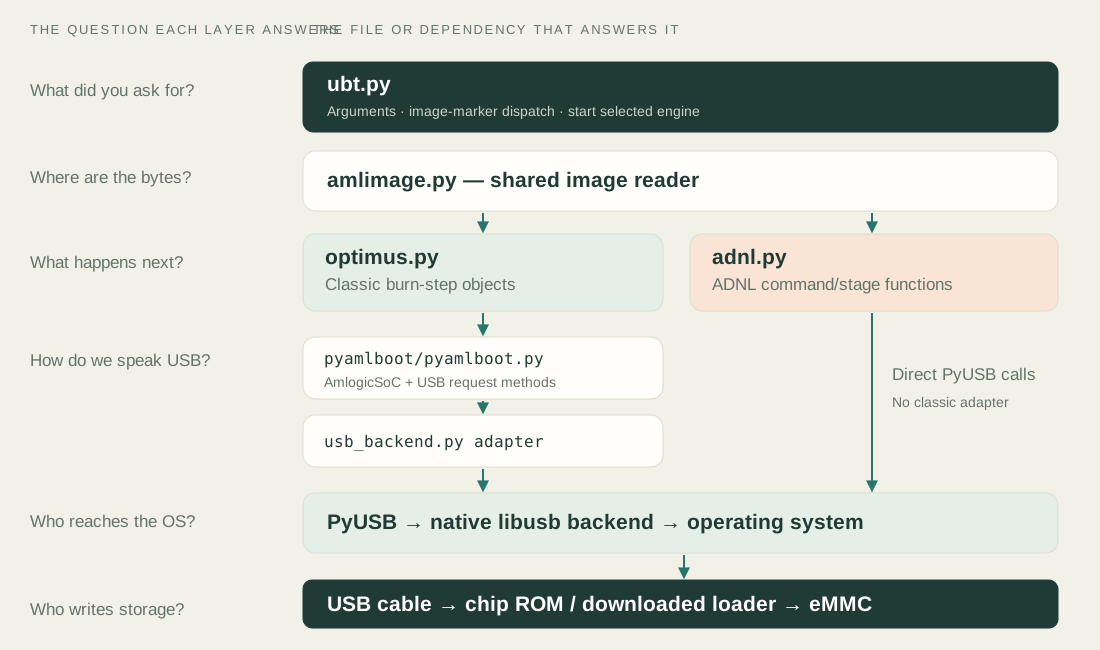
ubt.pyThe receptionist: reads your options and chooses a route.
amlimage.pyThe librarian: finds named items and reads bytes from the package.
optimus.pyThe classic-route conductor: builds and executes a list of burn steps.
adnl.pyThe newer-route conductor: handles ADNL commands and stages.
pyamlboot.pyThe classic USB vocabulary: identify, read, write, run and transfer media.
usb_backend.pyThe classic adapter: picks and wraps a native USB backend.
socid.pyThe interpreter: turns classic identification bytes into stage/security fields.
PyUSB is the Python USB interface. libusb is native host software underneath it. The operating system also needs permission to access the device. Installing Python packages alone does not guarantee a working USB backend.
In this checkout, the classic adapter tries libusb0 on Linux; ADNL lets PyUSB choose its default backend. “Install libusb” is not a guarantee that both routes are configured.
The chip’s built-in ROM starts the conversation. Downloaded loaders prepare memory and provide storage commands. The firmware must fit the AM6+, not just another box with a related chip.
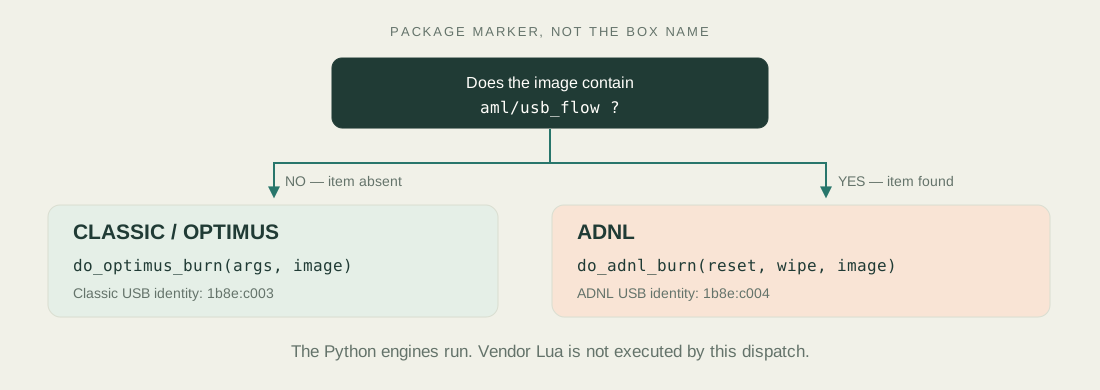
This Python route does not load the Windows vendor DLLs or execute the recovered vendor Lua. A marker called usb_flow selects Python code; it is not run as a Lua script here.
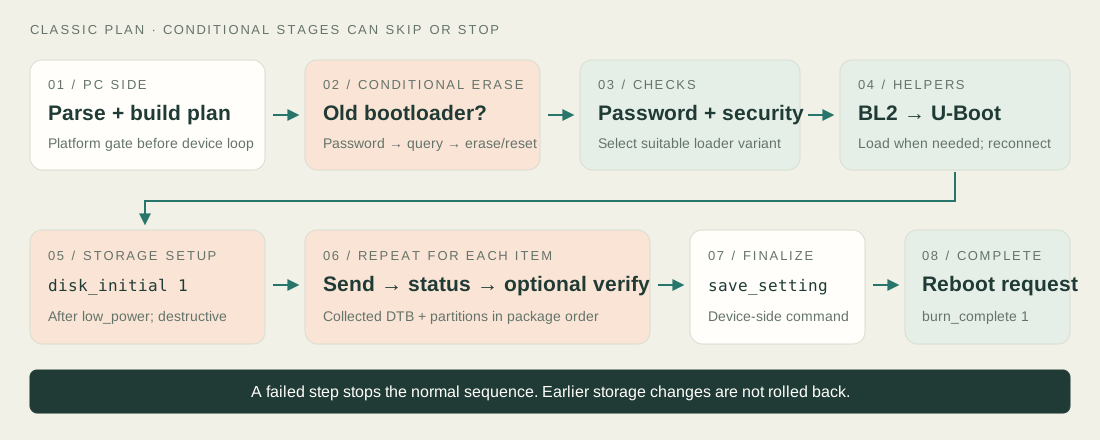
boot-g12.py load boot software; ubt.py orchestrates persistent firmware writing. G12B USB-boot support alone is not proof of end-to-end AM6+ flashing support. The checkout’s setup.py does not install ubt.py as a command, so this example is a source-checkout workflow.“Open this package, prepare storage with normal erase policy, flash its selected route, then request a reboot.”
python ubt.py \
  --img ~/A_UGOOS/sbx_ugoos_am6_encrypted_atv_54_21/sbx_ugoos_am6_encrypted_atv_54_21.img \
  --wipe normal \
  --reset
Shown for understanding—not a recommendation to run before validation.
python ubt.pyAssumes your working directory is pyamlboot/ in the source checkout and python is Python 3. Imports and dependencies must work before argument parsing can finish.
--img … .imgYour shell expands the unquoted ~ to your home folder. Python opens the file for binary reading, then parses its header and item index. The full image is not necessarily loaded into RAM at once.
--wipe normalnormal → 1, no → 0, all → 3. The selected engine passes that number to the device’s storage-initialization command. Normal is destructive; it does not mean “keep my apps.”
--resetClassic: burn_complete 1. ADNL: reboot. This happens only if execution reaches the final step; it does not certify that Android will boot successfully.
Two easily missed details. Your command supplies no --password, so a locked classic USB interface may stop it. It also omits --no-erase-bootloader: the classic plan therefore includes an early, conditional old-bootloader erase/reset step. This is separate from --wipe normal.
Use ordinary spaces and put each backslash directly before the newline. A space after a backslash breaks shell line continuation. The command above normalizes the formatting of the supplied example.
Choose a route to explore. This changes the explanation only—it does not inspect an image or connect to anything.
ROM / IPL: built into the chip, can accept initial boot code.
BL2 / SPL: prepares memory and helps load later boot software.
U-Boot / TPL: provides the commands that write firmware storage.
The program identifies the current stage. A device already in a later stage may skip some downloads. This is not a promise that every connected board is accepted.
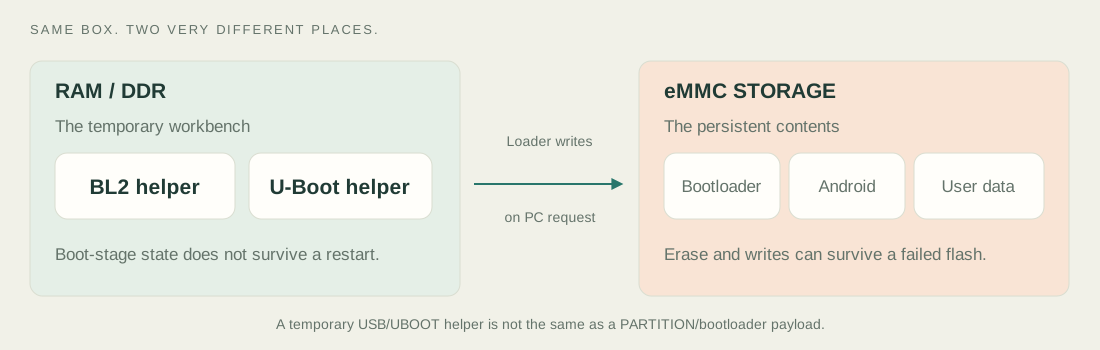
A USB/UBOOT loader runs as a temporary helper. A PARTITION/bootloader item, if present, is firmware written to persistent storage. Similar names, different jobs.
A loader running successfully from RAM does not prove the on-storage firmware or the next Android boot is correct.
BurnStepDownloadMedia first tells the loader the destination, the item’s normal or sparse format, and its encoded size. A sparse image is a compact recipe for blocks, not a ZIP archive; the loader understands how to expand it.
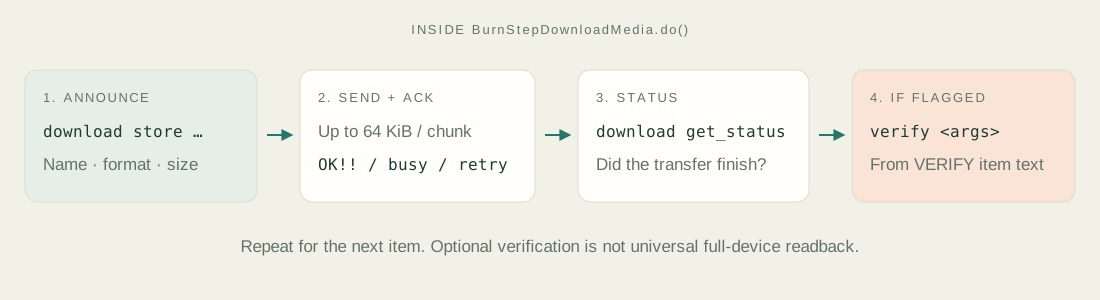
For dtb/meson1, the destination is mem dtb; for PARTITION/… it is store <name>. The loop sends up to 64 KiB per chunk. It expects an OK!! acknowledgement and handles busy replies and limited resend attempts. Transfer status and optional device-side verification are separate checks.
Verification uses text from the matching VERIFY/<name> item. It is not a universal host-side readback of every partition. A missing required verification item can fail late. Source: BurnStepDownloadMedia.
The S922X/G12B family is relevant to pyamlboot. That does not establish compatibility with this AM6+, its security configuration, or this particular image.
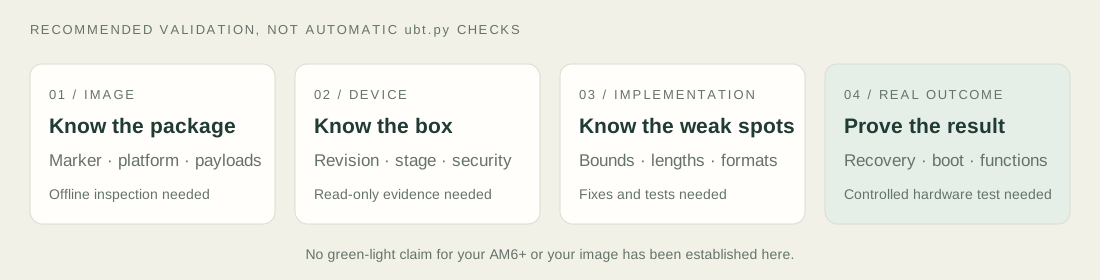
The inspected image reader checks magic and format version but does not fully validate CRC, all item bounds, overlaps or malformed counts. Some reads rely on assertions. A package opening successfully is not a safety certificate.
The classic SPL constructor accepts only platform value 0x0811. A matching chip family alone does not get past that gate.
An erase or write may have completed before a timeout or exception. Stopping the PC program does not undo device-side changes. A successful transfer log does not prove the box boots.
“Normal” erase is intended to exclude reserved key data in the documented classic loader policy, but actual behaviour depends on the loader and layout. It is not a backup or a promise to preserve DRM, settings or user data.
This is not a full setup or recovery tutorial. No --dry-run exists in the inspected ubt.py, and its image-loading path is not a comprehensive preflight. No buttons here execute the example command.
Source inspection, not observed execution. Diagrams are original explanatory drawings, not screenshots or captured device traces.
Arguments, dispatch rule, class structure and command ordering in this local checkout.
Stage/security branches and image items depend on real inputs. The step explorer illustrates them.
Your image contents, AM6+ compatibility, actual erase scope, runtime behaviour and final boot.
Snapshot: local pyamlboot base commit d2857f4, with uncommitted changes in adnl.py. The explorer describes the files inspected for this guide, not an assertion about all upstream versions. Existing fix branches/PRs are not assumed to be cumulatively applied.